The Complete Guide to TikTok Video Formats and Quality
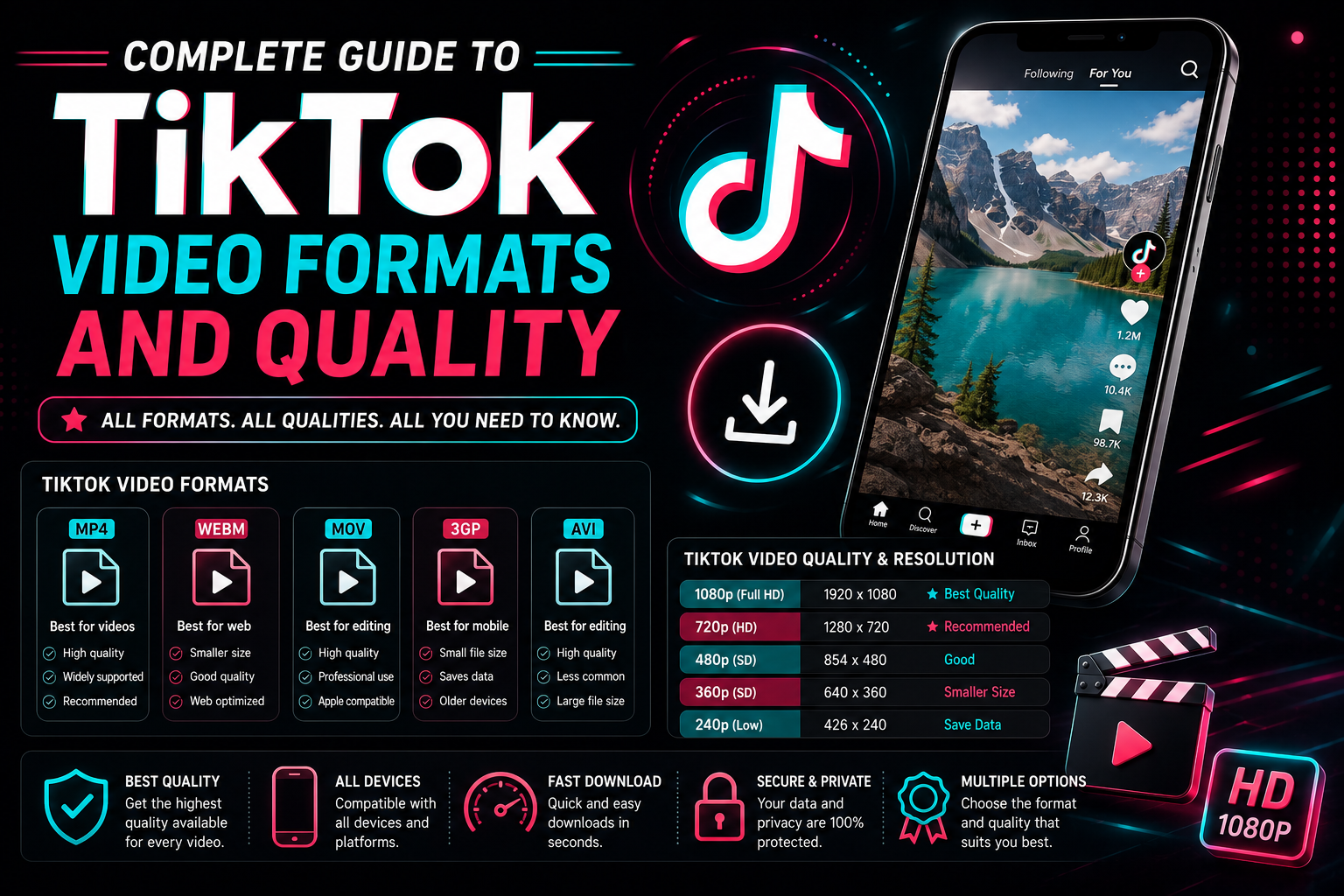
Table of Contents
- Introduction to Short-Form Video Logistics
- Core Layout Parameters: Resolution & Aspect Ratio
- File Containers: MP4 vs. MOV on TikTok
- Cracking the Code: Bitrate & Compression Mechanics
- Frame Rates: Stabilizing at 30 FPS vs. 60 FPS
- Preventing the Blur: Overcoming TikTok's Compression
- How Downloader Pipelines Preserve Asset Fidelity
- Frequently Asked Questions
Introduction to Short-Form Video Logistics
In the digital economy, understanding the technical specifications of your content media is just as critical as the creative concept itself. TikTok has grown into an international powerhouse powered entirely by highly optimized, vertical, short-form media files. Behind the user interface lies a highly complex content delivery infrastructure designed to ingest millions of video streams daily, transform them, and push them down localized broadband pipes instantly.
For video editors, performance marketers, media curators, and educators, maintaining high quality is a constant battle. Uploading media with incorrect parameters causes TikTok's aggressive compression algorithms to downgrade your content into a pixelated, blurry mess. Conversely, downloading and archiving videos with improper tools introduces generation loss and audio sync issues. This comprehensive guide breaks down the core technical architecture of TikTok video formats, container profiles, and layout settings to ensure your video assets remain flawless from timeline to export.
Core Layout Parameters: Resolution & Aspect Ratio
TikTok is built from the ground up around a smartphone-first layout model. The primary platform viewport mandates a portrait presentation matrix. Content that doesn't natively fill this area will be automatically letterboxed with harsh black bars or unnatural blur filters, immediately degrading audience immersion.
| Specification Metric | Optimal Target Value | Technical Constraints & Bounds |
|---|---|---|
| Aspect Ratio | 9:16 (Vertical) | 1:1 (Square) is supported but letterboxed; 16:9 is strongly discouraged unless using the landscape player interface. |
| Pixel Dimensions | 1080 x 1920 Pixels | Maximum upload boundary is 1080p. 4K source video streams will be scaled down during network ingestion. |
| Orientation | Vertical / Portrait | Must be framed for single-handed vertical smartphone interaction. |
While the internal video engine can scale alternative configurations, editing your timelines directly inside a native 1080x1920 box guarantees that graphic titles, caption panels, and focal elements sit within the application's "Safe Zones" and won't get cut off by user interface buttons on the sides.
File Containers: MP4 vs. MOV on TikTok
When rendering finished master clips out of video editors like Adobe Premiere Pro, DaVinci Resolve, or Final Cut Pro, your choice of file wrapper is crucial. The primary architecture of TikTok accepts two primary container formats: MP4 and MOV.
The standard MP4 (MPEG-4 Part 14) framework is widely considered the most versatile and efficient container type for cross-platform delivery. It encapsulates video tracks encoded via H.264 compression models along with AAC audio channels, resulting in a compact file size that retains excellent visual clarity. If you use a Windows workstation or plan to process downloads across a variety of hardware architectures, MP4 is your safest path. MOV, developed natively by Apple for QuickTime engines, is also highly compatible with iOS uploads. However, MOV files often carry larger data footprints, which can slow down network transit pipelines if you are handling bulk asset uploads under unstable network conditions.
Cracking the Code: Bitrate & Compression Mechanics
Bitrate represents the sheer density of data transmitted per second inside a video stream, typically measured in Megabits per second (Mbps). Many creators make the critical mistake of exporting their vertical footage at ultra-high, cinematic bitrates (e.g., 50 Mbps or 100 Mbps), assuming this will ensure crisp quality on the web. This is a big mistake.
When you present an over-engineered, massive file to the upload servers, the system recognizes that the file is too dense to stream smoothly across standard cellular connections. As a result, it triggers a severe server-side compression pass, transcoding your footage with coarse quantization matrices that strip out color gradients and cause blocky pixel patterns. For the best results at 1080p resolution, target a balanced target bitrate between 15 Mbps and 20 Mbps using an H.264 profile. This profile hits the perfect sweet spot, providing ample data fidelity to keep details clean while staying small enough to slip through the server filters without triggering aggressive degradation.
Frame Rates: Stabilizing at 30 FPS vs. 60 FPS
Frame rate, quantified as Frames Per Second (FPS), determines the fluid rendering of motion across your screen. TikTok officially supports frame rates ranging from 30 FPS to 60 FPS. Selecting your frame rate is a strategic decision that depends heavily on the specific style of content you are producing.
Standard talking-head content, educational explainers, corporate briefings, and historical documentaries are best delivered at 30 FPS. This frame rate mirrors natural visual pacing, minimizes file size footprints, and reduces computational decoding demands on older phones. On the other hand, fast-paced action sequences, sports tracking clips, high-tempo dance choreography, and screen-captured gameplay loops benefit massively from 60 FPS. Delivering 60 frames per second cuts down motion blur and ensures high-speed movements look silky smooth, giving your media a premium, responsive feel.
Preventing the Blur: Overcoming TikTok's Compression
Have you ever spent hours polishing a clean, high-definition clip only to watch it turn muddy the moment it goes live on the platform? This issue can be solved by adjusting a few hidden settings within your workflow:
- Toggle 'Allow High-Quality Uploads': Before finalizing your video upload inside the mobile app, scroll down to "More Options" and verify that the "Allow high-quality uploads" switch is turned on. If this option is disabled, the app automatically throttles file sizes down to preserve cellular bandwidth, destroying your video's clarity.
- Stick to Constant Frame Rate (CFR): Many modern smartphone front-facing lenses record footage using Variable Frame Rate (VFR) to balance exposure settings. Professional editing timelines struggle with VFR, which can warp audio tracking and cause visual hitching. Run your source footage through transcoder tools to bake them into a rock-solid CFR profile before editing.
- Color Profile Alignment: Render all media outputs utilizing the standard sRGB / Rec. 709 color space matrix. If you attempt to upload advanced HDR (High Dynamic Range) layers or wide log profiles without careful tone mapping, the platform's standard web transcoders will wash out your colors, turning vibrant tones gray.
How Downloader Pipelines Preserve Asset Fidelity
When downloading videos from TikTok for archival storage, deep text analysis, or multimedia presentations, maintaining the original file quality is just as important as the upload process. Relying on screen recorders is a terrible approach—it recompresses the display layout, degrades the audio into a mono track, and bakes in local UI notifications.
Using a dedicated, server-side extraction pipeline like TikTop fixes these issues. When you input a target URL, the platform bypasses user-interface styling layers and directly queries TikTok's primary data storage servers. It targets the raw, unadulterated MP4 media file exactly as it was compiled post-ingestion. By stripping away watermarks without decoding or re-encoding the core video track, the file is saved onto your system without any generation loss. This gives you a true 1:1 master backup file that is ready for demanding production uses or presentation integration.
Frequently Asked Questions
Does TikTok support 4K video uploads?
No, the app does not stream content in native 4K. If you submit a 4K file (3840x2160), the processing servers will force a downscaling pass to compress the file into a standard 1080p footprint. To prevent unwanted compression artifacts, it is always best to downscale your footage inside your editing software before uploading.
What is the maximum file size limit for a TikTok video upload?
For iOS devices, the maximum file size boundary sits near 287.6 MB. On Android devices, the cap is significantly tighter, hovering around 72 MB. If you upload via a web browser on a desktop machine, the platform accommodates files up to 1 GB in size.
Why does the audio track on my downloaded video sound flat?
TikTok optimizes file delivery by utilizing highly efficient AAC audio compression, running at a standard bit speed of 128 kbps or 192 kbps in stereo. If you notice severe distortion on downloaded clips, avoid mobile apps that use rough screen-scraping techniques. Web utilities like TikTop parse the source data stream directly, preserving the creator's full original audio mix.
Can I upload horizontal 16:9 videos directly to TikTok?
Yes, you can upload widescreen videos, and the app will provide a full-screen landscape player button for mobile users. However, because vertical layout content commands much higher viewer completion metrics, re-framing or cropping your footage into a vertical container is almost always the better choice for reach and engagement.
Extract Pristine Master Quality Media Assets
Bypass screen recorders and compression loss. Grab 1080p, watermark-free files straight from the source servers.
Launch High-Fidelity Downloader
Related Content Strategy Guides
Downloading TikTok Videos for Presentations and School Projects
Learn how to legally and professionally download, embed, and cite TikTok videos for academic decks.
Read Article →
How to Organize Hundreds of Downloaded Videos
Stop drowning in digital clutter. Learn our expert framework for naming, structuring, and sorting.
Read Article →
TikTok Content Ideas for Beginners
Stuck on what to post? Discover actionable TikTok content ideas, video blueprints, and structural frameworks.
Read Article →